
๐Ÿ“ฐ

News & Updates

11 posts in this category

Industry news and platform updates

Community

The Alpha Lounge

Share strategies, ask questions, celebrate wins with fellow bloggers.

Create a free account to post, like, and comment in the community.

Naveed SHAH
Naveed SHAHฮฑยท 5/30/2026(edited) Pinned

๐ŸŽฏ Pinterest Auto-Pin Setup - Complete Guide (Cookie Method)

Assalam-o-Alaikum pyare bhaiyo aur dosto! Aaj main aapko bataunga ke Pinterest auto-pin AlphaPost ke saath kaise setup karte hain - bilkul free, sirf 2 minute me. Pinterest ki official approval ka wait nahi karna padega.

Kyun cookie method?
Pinterest ka official API approval kaafi time leta hai. Cookie method se aap aaj hi auto-pin shuru kar sakte hain. Bilkul safe hai kyunke Pinterest ko real login lagta hai. Limit: 2 pins per day per account, taake safe rahe.

๐Ÿ“‹ Aapko Kya Chahiye

  • โ–ธ Pinterest Business account (personal account kaam nahi karega)
  • โ–ธ Kam az kam 1 board bana hua ho
  • โ–ธ Chrome/Firefox/Edge browser (mobile se nahi)
  • โ–ธ AlphaPost account (jo aapke paas already hai)

๐Ÿ”‘ Step 1: Pinterest Pe Login Karein

Apne computer ke browser me pinterest.com kholein aur apne account me login karein. Confirm karein ke aap sahi se logged in hain - apna profile picture top-right me dikhna chahiye.

๐Ÿ› ๏ธ Step 2: Developer Tools Kholein

Keyboard pe F12 key dabaein. Ek panel khulega screen ke right ya neeche. Yeh browser ka DevTools hai.

Alternative: Page pe right-click karein aur "Inspect" ya "Inspect Element" select karein.

๐Ÿช Step 3: Cookies Wali Section Find Karein

DevTools me upar "Application" tab par click karein (Chrome/Edge me). Firefox me "Storage" tab hota hai.

Left side me Cookies ka section expand karein aur https://www.pinterest.com" target="_blank" class="text-gold-500 hover:text-gold-400 underline" rel="nofollow noopener noreferrer" target="_blank">https://www.pinterest.com" target="_blank" class="text-gold-500 hover:text-gold-400 underline" rel="nofollow noopener noreferrer">https://www.pinterest.com par click karein. Aapko Pinterest ki saari cookies ki list dikhe gi.

๐Ÿ“‹ Step 4: 2 Cookies Copy Karein

List me se ye 2 cookies dhoondhna hain:

  • โ–ธ _pinterest_sess (bohat lambi value, 1000+ characters)
  • โ–ธ csrftoken (chhoti value, around 32-40 characters)

Har ek pe click karein - "Value" column me jo bhi text hai usko select karke copy karein.

โš ๏ธ Zaroori Note: Cookie ka NAME nahi, balke VALUE copy karna hai! Name aur value alag columns me hote hain.
image

๐Ÿ”— Step 5: AlphaPost Me Connect Karein

Naya tab kholein aur AlphaPost dashboard pe jayein:

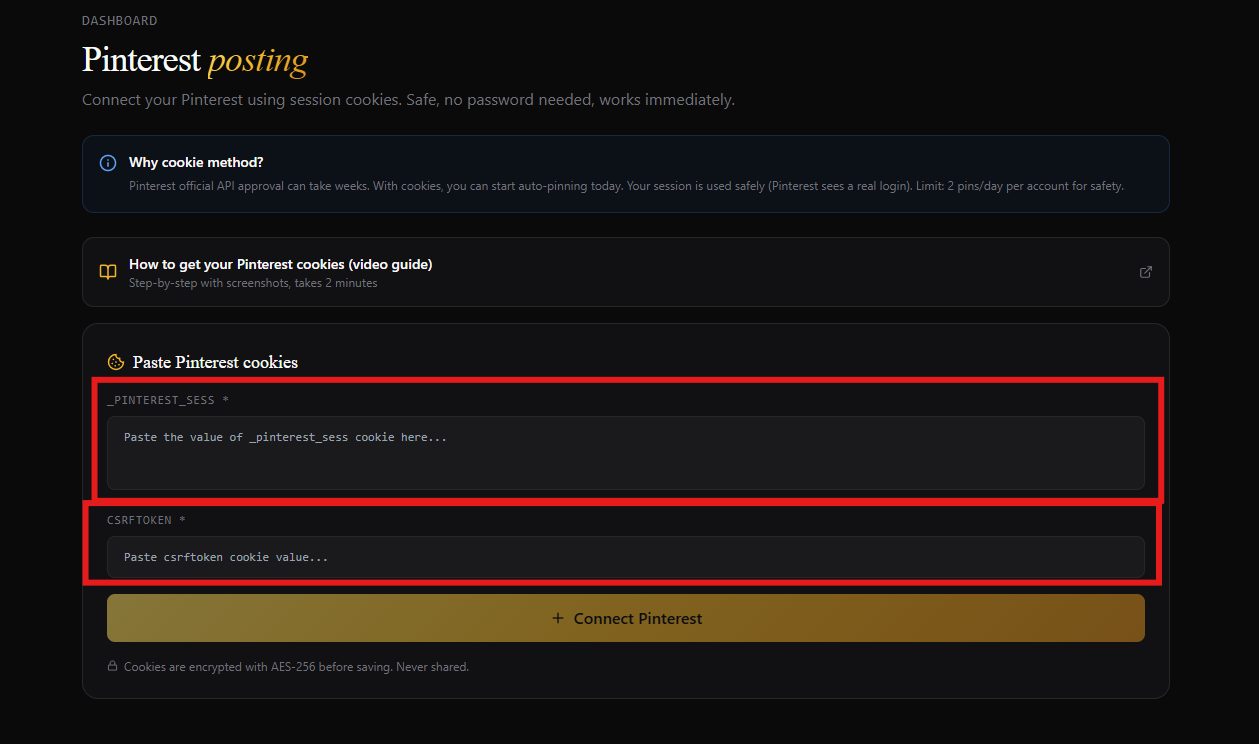
  • โ–ธ Dashboard โ†’ Pinterest par click karein
  • โ–ธ _pinterest_sess wali value upar wale box me paste karein
  • โ–ธ csrftoken wali value neeche wale box me paste karein
  • โ–ธ "Connect Pinterest" button click karein

Agar sab sahi hai, to "Pinterest connected" green message aayega aur aapka username dikhe ga.

๐Ÿ“Œ Step 6: Apne Boards Add Karein

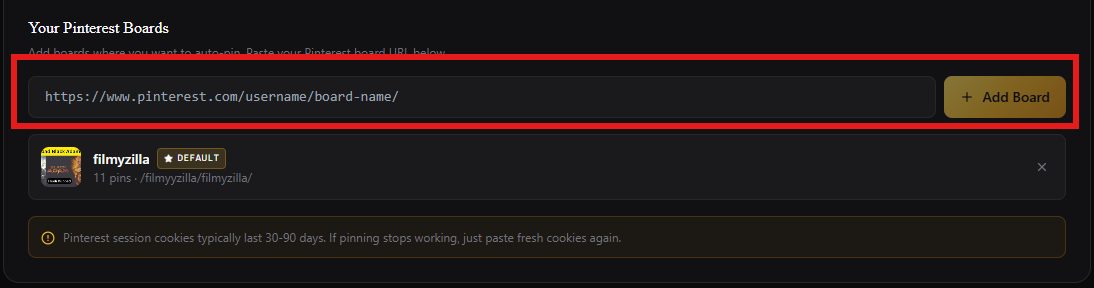
Pinterest pe wapas jayein aur jo board pe pins lagana chahte hain usko kholein. Browser ke address bar se uska URL copy karein, jaisa:

https://www.pinterest.com/aapka-username/board-ka-naam/" target="_blank" class="text-gold-500 hover:text-gold-400 underline" rel="nofollow noopener noreferrer" target="_blank">https://www.pinterest.com/aapka-username/board-ka-naam/" target="_blank" class="text-gold-500 hover:text-gold-400 underline" rel="nofollow noopener noreferrer">https://www.pinterest.com/aapka-username/board-ka-naam/
image

AlphaPost ke Pinterest page pe "Your Pinterest Boards" section me wo URL paste karein aur "Add Board" click karein. Board ka naam, image aur pin count automatically aa jayega.

Aap jitne marzi boards add kar sakte hain. Default board set karne ke liye star icon click karein - jo board default hoga waha pins jayenge.

๐Ÿš€ Step 7: Order Me Pinterest Enable Karein

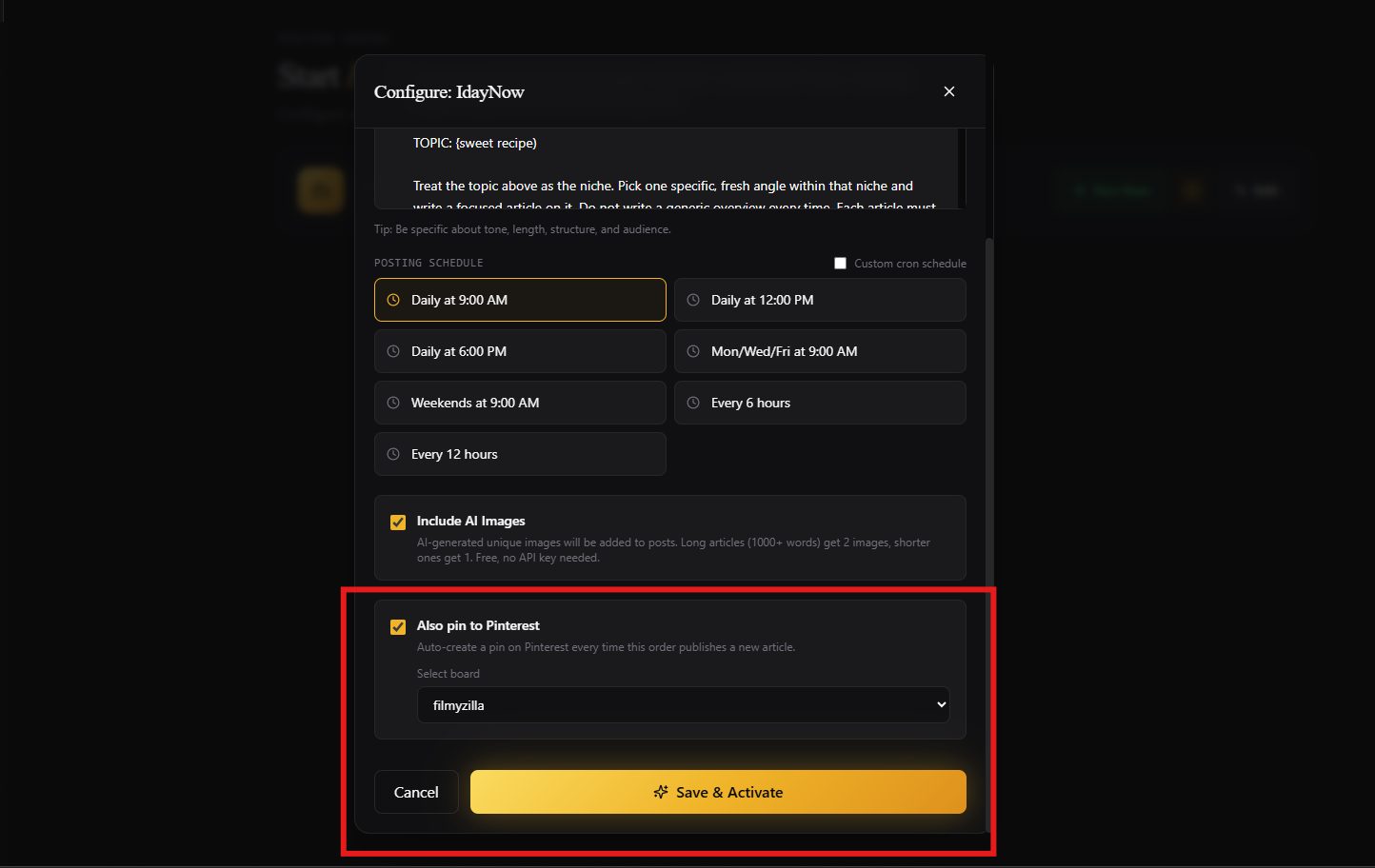
Ab Dashboard โ†’ Start Posting pe jayein. Apna order kholein ya naya banayein.
image

  • โ–ธ "Auto-pin to Pinterest" wala checkbox enable karein
  • โ–ธ Board select karein (ya default rahe)
  • โ–ธ Order save karein

Bas! Ab jab bhi aapka article publish hoga, automatic Pinterest pe pin ban jayega.

โš ๏ธ Zaroori Baatein

  • โ–ธ Max 2 pins per day: Account safety ke liye limit hai. Aapka Pinterest safe rahe ga.
  • โ–ธ Cookies validity: Cookies 30-90 din tak chalti hain. Agar pinning band ho jaye to fresh cookies wapas paste kar dein.
  • โ–ธ Article me image: Pin tabhi banega jab article me image ho. Bina image ke pin nahi ban sakta.
  • โ–ธ Encryption: Aapki cookies AES-256 se encrypt hoti hain. Bilkul safe.

โ“ Agar Problem Aaye

"Invalid or expired cookies" error: Aap Pinterest se logout ho gaye hain, ya cookies purani hain. Pinterest pe wapas login karein aur fresh cookies copy karein.

Board add nahi ho raha: Sahi board URL paste karein, na ke profile URL. Board URL format: pinterest.com/username/board-name/

Pin nahi ban raha: Check karein ke order me Pinterest enable hai, board selected hai, aur article me image hai. Daily limit (2/day) bhi check karein.

โœ… Aaj se shuru karein! 2 minute ka setup hai aur aapke articles automatically Pinterest pe share hone shuru ho jayenge. Free traffic, free reach. Koi sawaal ho to comment me poochein - main jawab dunga.

Allah kamyabi de aap sab ko!

183913484
Naveed SHAH
Naveed SHAHฮฑยท 5/20/2026(edited) Pinned

๐Ÿ”ฅ AI Writing Theek Ho Gayi - Aur Blogger Issue Ka Final Solution

Salaam doston! Bohat saare users na complain ke thi ke AI sahe nai likh raha. Word count miss ho raha tha, ajeeb words use kar raha tha, aur internal links ka koi pata he nai tha.

Aaj sab kuch fix kar diya hai. Sath he ek important tip un logon ke liye jin ka posting kaam nai kar raha.

๐ŸŽฏ Problems Jo Users Na Report Ke Te

Ya cheezen sab keh rahe ta:

  • "AI sa 500 words mango to 1500 likh deta hai"
  • "AI sa 1000 words mango to 600 likh deta hai"
  • "AI weird English words use karta hai, jaise koi insaan nai likhta"
  • "Em-dashes (โ€”) har jagah hote hain, lagta hai AI ne likha"
  • "Internal linking nai ho rahi, SEO suffer kar raha"

Sun li sab ki baat. Sab fix ho gaya.

โœ… 1. AI Ab Word Count EXACTLY Follow Karta Hai

Ab AI tumhare prompt ko dhyaan se padhta hai aur word count detect karta hai.

Likho:

  • "write 500 words on SEO" โ†’ 500 words milte hain
  • "1200 word guide on AdSense" โ†’ 1200 words milte hain
  • "around 800 words" โ†’ 800 ke aas paas

Agar tumna word count mention nai keya, AI automatic 1000 se 1500 words likhta hai. Ab koi random short ya bloated article nai milega.

Ya phrases sab kaam karte hain:

  • "500 words"
  • "1000-word article"
  • "around 800 words"
  • "length: 1500"
  • "about 700 words"

๐Ÿง  2. User Prompt Ab Top Priority Hai

Pehle AI apni marzi karta tha. Ab tumhara prompt sab se important hai.

Agar tum likho:

  • "backlinks par beginners ke liye article" โ†’ AI EXACTLY us topic par likhega
  • "casual tone mein likho" โ†’ AI casual tone use karega
  • "5 examples add karo" โ†’ AI 5 examples dega
  • "Pakistani audience focus karo" โ†’ AI us hisab se likhega

Jo bhi tum bolo, AI pehle wahi follow karega. Phir backend ki rules apply hoti hain upar sa.

๐Ÿ”’ 3. Backend Rules Jo Hamesha Apply Hoti Hain

Tumna kuch bhi likho prompt mein, ya cheezen automatic hoti hain:

  • Em-dashes (โ€”) ban - lagta hai AI ne likha, isliye totally khatm
  • AI words ban jaise delve, leverage, utilize, navigate, plethora, myriad, paradigm, robust, comprehensive
  • AI phrases ban jaise "In conclusion", "In today's digital age", "Let's explore", "It's important to note"
  • Short paragraphs - 2 se 4 sentences max
  • Easy English - 10 saal ke bacha samajh sake
  • Real human tone - contractions ke saath, natural flow

Ya sab tumhain mangne ki zaroorat nai. AI khud karta hai ab.

๐Ÿ”— 4. Auto Internal Linking - The Big SEO Win

Ya wala feature SEO ke liye game changer hai. Har article mein ab 2 internal links automatic add hote hain:

  • Link 1 tumhare blog ki homepage par jata hai with natural anchor text
  • Link 2 tumhare last published article par jata hai

Yeh Kyun Important Hai?

Google internal links ko bohat pasand karta hai. Ya help karte hain:

  • Page authority sab posts mein spread karna
  • Readers ko blog par zyada time tak rokhna
  • Old posts ki ranking improve karna
  • Site structure Google ko clearly batana

Real example: Agar aaj tumna "SEO basics" par post publish ke, to kal ki "keyword research" wali post automatic us se link karegi. Tumhara blog khud apna link network banata jayega.

Aur AI ya links ko naturally paragraphs ke andar daalta hai, forced ya spammy nai lagte.

๐ŸŽฏ 5. SEO-Friendly Titles

Titles ab simple aur direct banta hain:

  • Main keyword shuru mein hota hai jab possible ho
  • Koi clever wordplay nai
  • Koi "Unveiling the Tapestry of..." type bekaar wali language nai
  • 70 characters ke neeche
  • Reader aur Google dono samajh sakte hain

Pehle AI ya titles banata tha (bekaar):

  • โŒ "Unveiling the Tapestry of Blogging"
  • โŒ "The Quintessential Guide to SEO Mastery"

Ab AI ya banata hai (perfect):

  • โœ… "How to Start a Blog in 2025"
  • โœ… "5 Free SEO Tools That Actually Work"
  • โœ… "Why Your AdSense Got Rejected (And How to Fix It)"

๐Ÿ› ๏ธ 6. Broken URLs Fix

Kuch users na notice keya tha ke AI URLs ko break kar deta tha. example.com ko example. com bana deta tha with spaces.

Ab server-side cleanup lagaya hai jo publish karne se pehle sab spaces aur encoding errors remove kar deta hai. Tumhare links hamesha kaam karenge ab.


๐Ÿšจ Important Tip - Agar Tumhari Posting Nai Ho Rahi

Bohat sa users complain kar rahe te ke unka auto-posting kaam nai kar raha ya purani settings stuck hain.

Solution Bohat Easy Hai

Bas ya karo:

  1. Dashboard kholo
  2. Connect Blogger section mein jao
  3. Apna blog delete karo (Delete button par click)
  4. Phir Connect Blogger dobara click karo
  5. Wahi blog dobara connect karo
  6. Authorize Blogger click karke OAuth complete karo

Bas 30 seconds ka kaam hai. Lekin forever khatam ho jata hai issue aur sab kuch smooth chalne lagega.

Yeh Kyun Karna Padta Hai?

Jab humna AI engine update ke aur internal linking, image generation, sab features add ke, to purani Blogger connections purani settings ke sath stuck reh gae the. Reconnect karne sa fresh tokens aur updated config mil jata hai.

Ya step bohat zaroori hai naye features ko 100% use karne ke liye.


๐Ÿ“ˆ Ya Sab Update Tumhare Liye Kya Matlab Hai?

  • Better word count control = tumhare articles intent ke hisab se match karte hain
  • Cleaner content = readers actually posts complete padhte hain
  • Auto internal links = Google ko connected, authoritative site dikhte hai
  • SEO-friendly titles = search se zyada clicks aate hain

Aur ya sab without kuch extra kiye. Bas naya order run karo, AI ka kamaal dekho.

๐Ÿ™ Final Words

Pehla wo Blogger reconnect karo (jin ki posting issue hai). Phir koi fresh order banao. Different word counts try karo. Dekho ya kaisa lagta hai.

Koi issue ho? Mujhe @naveedshah se mention karo aur main fast fix karunga.

Comments mein feedback do. Naye features kaisa lag rahe hain bata do.

AlphaPost team ki taraf sa thanks for your patience aur support. ๐Ÿ™

73107182
AHMAD RAZA
AHMAD RAZABยท 5/28/2026(edited)

Please Visit & Review Our Website โ€“ Nexora Media 360

Hello everyone,

Please take a moment to visit our website:
๐Ÿ‘‰
https://nexoramedia360.blogspot.com/" rel="nofollow noopener noreferrer" target="_blank" class="text-gold-500 hover:text-gold-400 underline">https://nexoramedia360.blogspot.com/">https://nexoramedia360.blogspot.com/
We would really appreciate it if you could explore the articles, read the content, and share your honest feedback about the website design, quality, and overall experience.

Your suggestions and reviews will help us improve and make the platform better for everyone.

Thank you for your support and time!

110843

๐Ÿค– AI Just Got Smarter - Better Prompts, Cleaner Content, Auto Internal Links

Hey everyone! Quick update on the AI engine. I just shipped some big fixes that solve real problems many of you reported. Here's what changed.

๐ŸŽฏ The Problem

A lot of you said the same thing:

  • "I ask AI for 500 words, it gives me 1500."
  • "I ask AI for 1000 words, it writes 600."
  • "AI uses weird words nobody talks like."
  • "There are em-dashes everywhere."
  • "Internal linking? What's that?"

I heard you. Now it's fixed.

โœ… 1. AI Now Respects Your Word Count Exactly

The AI now reads your prompt and detects if you mentioned a word count.

Say "write 500 words on SEO" and you get around 500 words. Not 1500.

Say "write a 1200-word guide on AdSense" and you get around 1200 words. Not 800.

If you don't mention any length, the AI defaults to a solid 1000 to 1500 words. No more random short or bloated articles.

Works with phrases like:

  • "500 words"
  • "1000-word article"
  • "around 800 words"
  • "length: 1500"
  • "about 700 words"

The AI picks up on all of these.

๐Ÿง  2. Hybrid Prompt System

Your prompt is now the highest priority.

If you say:

  • "Write about backlinks for beginners" - AI writes about THAT, not a related topic
  • "Make it sound casual" - AI matches that tone
  • "Add 5 examples" - AI adds 5 examples
  • "Focus on Pakistani audience" - AI adjusts accordingly

Whatever you put in your prompt, the AI follows it first. Then it applies the backend rules on top.

๐Ÿ”’ 3. Always-On Quality Rules

These rules apply to every article, no matter what you write in your prompt:

  • No em-dashes ( the long dash that screams "I'm an AI" )
  • No AI words like delve, leverage, utilize, navigate, plethora, myriad, paradigm, robust, comprehensive
  • No AI phrases like "In conclusion", "In today's digital age", "Let's explore", "It's important to note"
  • Short paragraphs of 2 to 4 sentences max
  • Simple English a 10-year-old can understand
  • Real human tone with contractions and natural flow

You don't have to ask for any of this. The AI does it automatically now.

๐Ÿ”— 4. Auto Internal Linking (The Big SEO Win)

This one matters for Google. Every article now gets 2 automatic internal links:

  • Link 1 points to your blog homepage with natural anchor text
  • Link 2 points to your most recent published article

Why does this matter? Google loves internal links. They help:

  • Spread page authority across your site
  • Keep readers on your blog longer
  • Boost rankings for older posts
  • Signal site structure to crawlers

The AI weaves these links into the article naturally. They don't look forced or spammy.

Real example: if you publish a post about "SEO basics" today, your next article on "keyword research" will automatically link back to it. Your blog builds its own link graph.

๐ŸŽฏ 5. SEO-Friendly Titles

Titles are now simple and direct:

  • Includes the main keyword at the start when possible
  • No clever wordplay
  • No "Unveiling the Tapestry of..." nonsense
  • Under 70 characters
  • Easy for both readers and Google to understand

Examples of titles the AI generates now:

  • "How to Start a Blog in 2025"
  • "5 Free SEO Tools That Actually Work"
  • "Why Your AdSense Got Rejected"

๐Ÿ› ๏ธ 6. Bonus Fix - Broken URLs

Some of you noticed AI was breaking URLs into pieces with spaces. Like turning example.com into example. com.

I added a server-side cleanup that strips out any spaces or encoding errors before publishing. Your links will always work now.


๐Ÿ“ˆ What This Means for Your Blog

Better word count control means your articles match your intent. Cleaner content means readers actually finish your posts. Auto internal links mean Google sees a connected, authoritative site. SEO-friendly titles mean more clicks from search.

All without you doing anything extra.

๐Ÿ™ Test It Out

Run a fresh order. Try different word counts. See how it sounds. Drop your feedback in the comments below.

Found something that still needs work? Mention me with @naveedshah and I'll fix it fast.

3746

Welcome to the New Alpha Lounge

What's New in AlphaPost Community

Hey everyone! We just shipped a massive update to make the Alpha Lounge feel like a real blogging community.

Features You Can Use Right Now

Here are the new things you'll notice:

  • Blue verified ticks for trusted accounts
  • Categories for organizing posts (you're in one right now)
  • Markdown support โ€” yes, this whole post is markdown
  • Italic text and bold text work everywhere
  • @mentions that notify the user
  • Image uploads directly in posts and comments
  • A nice notification bell in the header

Try the New Markdown Toolbar

When you write a post, look for the toolbar above the content box. You can:

  1. Make text bold or italic
  2. Add headings like the one above
  3. Create lists like this one
  4. Quote things like this:

"The best community is one where good ideas spread fast."

  1. Show code like const x = 42; inline
  2. Or full code blocks:
function greet(user) {
  return `Welcome, ${user.name}!`;
}

What About User Badges?

You'll see colored badges next to active users:

  • ๐Ÿฅ‰ Bronze for active members
  • ๐Ÿฅˆ Silver for trusted contributors
  • ๐Ÿฅ‡ Gold for top veterans
  • โญ Alpha for founders and VIPs (admin-granted)

Try Mentioning Someone

You can tag any user by typing @username in a post or comment. They'll get a notification.

2634